Text replacement for Windows 11, in every app
Type a short abbreviation in any app and Doable Macros puts your full text in its place. No scripting, no account, and it works offline.
Does Windows 11 have text replacement?
Not across all apps. Windows 11 has no setting that swaps an abbreviation for your text everywhere you type, the way a Mac’s Text Replacements do. Microsoft Office’s AutoCorrect does it, but only inside Office apps. Microsoft is building a Text Expander for PowerToys, its free add-on; on 23 November 2026 it is still in review and not released.
A text expander app fills the gap today. In Doable Macros an abbreviation is the start of a macro, so besides your text it can press keys, open an app or click a button afterwards.
How it works
Make a macro that starts When I type an abbreviation, such as ;addr, and give it a Paste text or Type text step. When you type the abbreviation, it is deleted and your text appears where you were typing: in Outlook, Word, a browser, a chat window or any other app.
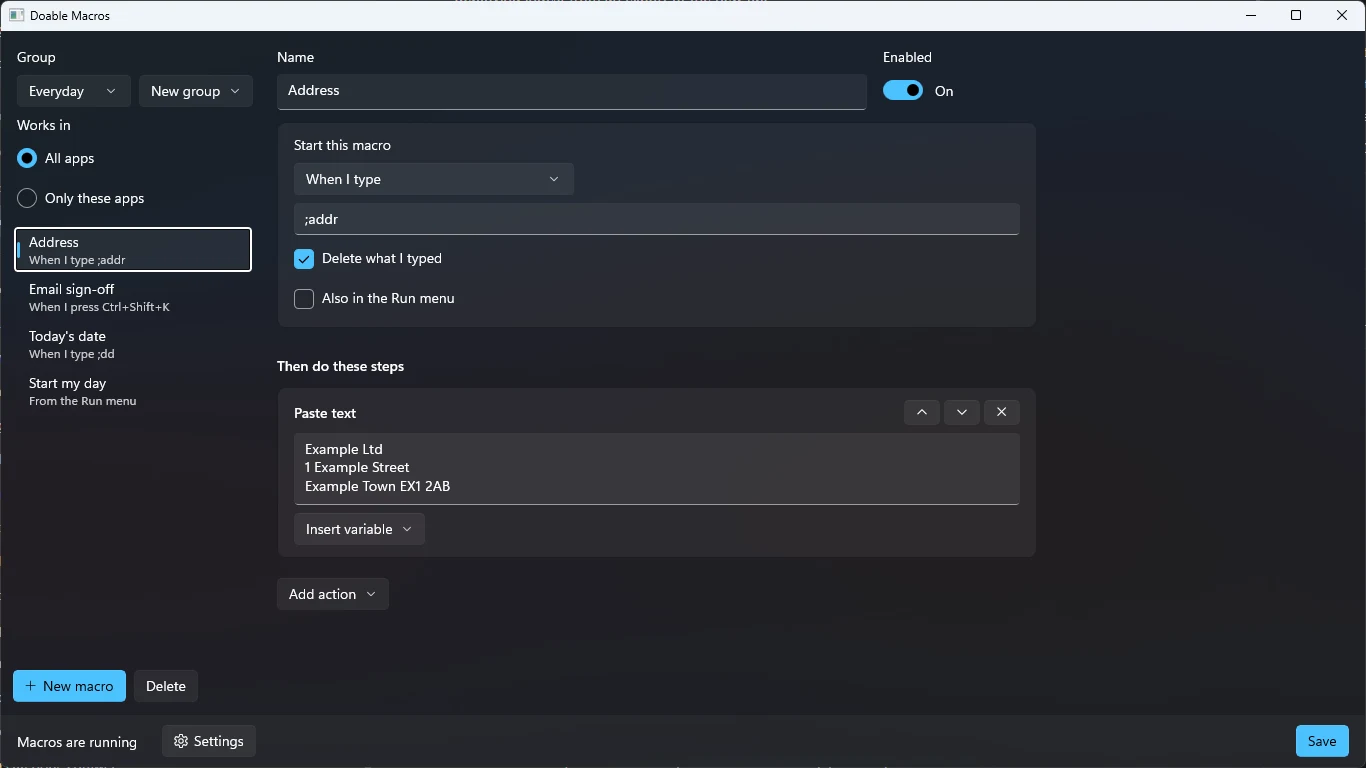
Text that fills itself in
Insert variable adds these to any Type text or Paste text step.
| {date} | Today’s date. |
|---|---|
| {time} | The time now. |
| {date:yyyy-MM-dd} | The date in any format you write, such as 2026-11-22. |
| {clipboard} | What you last copied, read only while the step runs. |
Abbreviations people set up first
| You type | It becomes | Step |
|---|---|---|
| ;sig | Your email sign-off | Type text |
| ;addr | A postal address on three lines | Paste text |
| ;dd | Today’s date, as 2026-11-22 | Type text with {date:yyyy-MM-dd} |
| ;ty | A thank-you reply, then Ctrl+Enter to send it | Paste text, then Press keys |
More than a text expander
Each abbreviation starts a full macro, so after the text it can press keys, open an app or a web page, wait, or click a button in another app by its name. The same macro can start from a keyboard shortcut instead, and a group of macros can work only in the apps you choose, so a ;sig for Outlook doesn’t fire in your code editor.
Paste text puts your clipboard back afterwards and keeps what it pasted out of clipboard history and the cloud clipboard. The app keeps only the last few characters you typed, in memory, to spot your abbreviations; it never saves or sends them.
Before you rely on it
- Abbreviations are matched exactly, and capital letters count.
- They are made for Latin keyboard layouts; other layouts and input methods may not work.
- It can’t type into apps that run as administrator, the lock screen or Windows security prompts.
- Free for up to 10 macros. Pro, a one-time purchase through the Microsoft Store, removes the limit.